

Author classes for the tech we don't cover.
Dethernety ships curated modules for mainstream stacks. Studio is for everything else: proprietary services, internal platforms, specialized middleware. AI proposes, the system validates, you adjudicate.
{
  "title": "modbus-tcp-plc",
  "properties": {
    "network_zone": {
      "type": "string",
      "enum": ["dmz", "ot", "isolated"]
    },
    "write_auth_required": {
      "type": "boolean"
    },
    "function_codes_allowed": {
      "type": "array"
    }
  }
}Plain code-gen tools generate a wall of output and ask you to vet it line by line. Studio works the other way. Every AI change is a reviewable diff; Rego is syntax-checked and auto-tested before it reaches you; every attribute has to justify the rules it feeds. You adjudicate; the system enforces standards.
Two-pass classification (embedding match against the existing class library, then LLM for the residue). Sample-input firings on every Rego rule. MITRE technique IDs resolved against the live taxonomy. A ~30-attribute budget per class, every one earning its keep. Custom classes pass the same validation gates as the curated ones. Same standards, same loader, same engine downstream.
From description
to a deployable module.
Studio walks the same five stages every run. The AI proposes, the system validates, and you adjudicate between each step.
- 01
Describe
Tell Studio what you need: a component class for a Modbus PLC, a control for OT network segmentation, an exposure rule for unauthenticated SCADA writes. Free text, or pick an existing baseline class to improve. Studio resolves what you mean against the class library before the AI starts generating.
- 02
Generate
The AI produces a complete draft (JSON Schema, UI layout, Rego policies, configuration guide) and validates it before you see it. Rego syntax checked. Every rule tested against pass and fail samples. Every MITRE technique ID resolved against the live taxonomy. Failures are flagged or retried, not silenced.
- 03
Edit with live preview
A split-pane editor: schema on one side, the rendered form on the other. Drag fields into sections, set conditional visibility, edit titles and validation rules. Every change reflects immediately. Drop into raw JSON when you need full control.
- 04
Test the rules
Write Rego policies in a Monaco-backed editor with syntax highlighting. Run each rule against sample inputs: one that should trigger, one that should not. Pass or fail in milliseconds. No deploying a class to find out the rule was wrong.
- 05
Package
Compose classes into a deployable module: manifest, schemas, policies, sample tests, data files for ATT&CK and D3FEND mappings. Export as a versioned tar.gz that drops into Dethernety's module loader. Import existing modules to edit and re-export. No rebuild from scratch.
Tour the workspace.
A workspace per module, a class editor per class, an AI assistant on the right. Navigate with the arrows, dots, or arrow keys.
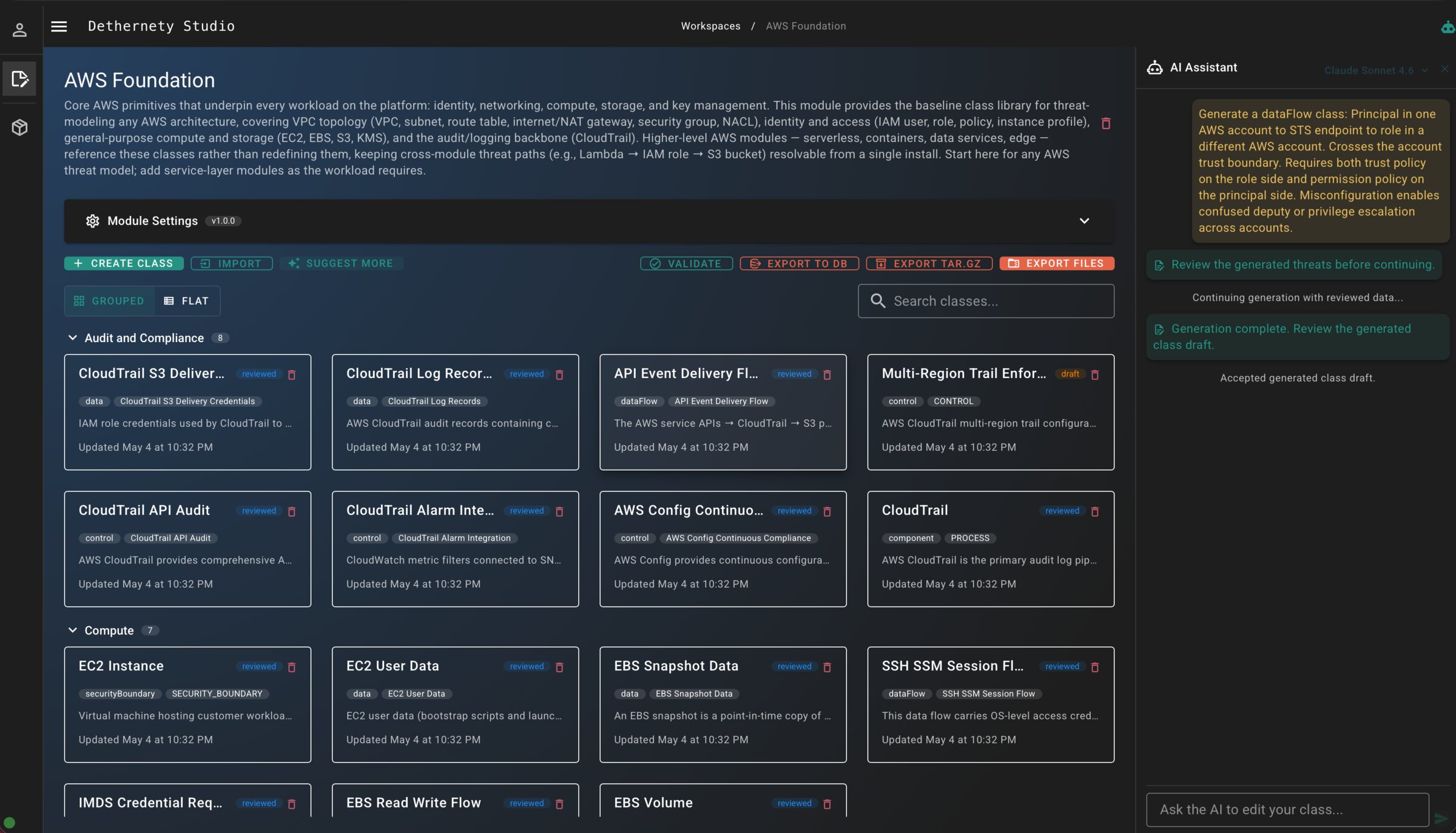
Workspace, with classes organized
A module is a workspace of classes grouped by category: audit, compute, network, identity. Search across the module, edit any class, export the whole thing as a versioned tar.gz when ready.
A module that drops into the loader.
Studio outputs a versioned tar.gz. Classes are grouped by type at the top level (components, controls, data flows, boundaries, data items). Each class is its own directory carrying schema, Rego policies, tests, MITRE mappings, and a configuration guide. It loads through the same path as every other module: yours, ours, third-party.
- Versioned, signed, reproducible: same input gets the same artifact
- Importable for editing, so a tweak doesn't mean starting over
- Tests and sample inputs ship with the module, alongside the schemas they validate
├── module.json
├── component/
│   ├── modbus-tcp-plc/
│   │   ├── class.json          # class definition
│   │   ├── schema.json         # JSON Schema
│   │   ├── policies.rego       # Rego policies
│   │   ├── tests.json          # sample inputs
│   │   ├── mitre.json          # ATT&CK mappings
│   │   └── guide.json          # configuration guide
│   ├── opcua-server/
│   └── scada-historian/
├── control/
├── dataFlow/
├── data/
└── securityBoundary/
Build the class the library is missing.
When your stack includes something the curated modules don't yet (a message bus, an internal auth tier, a specialized compute tier), Studio is where you fill the gap. Sign in, describe what you need, and the AI starts proposing.
Get Started