

Board-ready risk, straight from your model.
Turn a threat model into a draft risk report you can brief a board with: a likelihood × impact matrix, a coverage posture, a prioritized worklist, ten deterministic checks, and a risk register your team owns. Every number resolves to something in your model, so anyone can regenerate the same report, byte for byte.
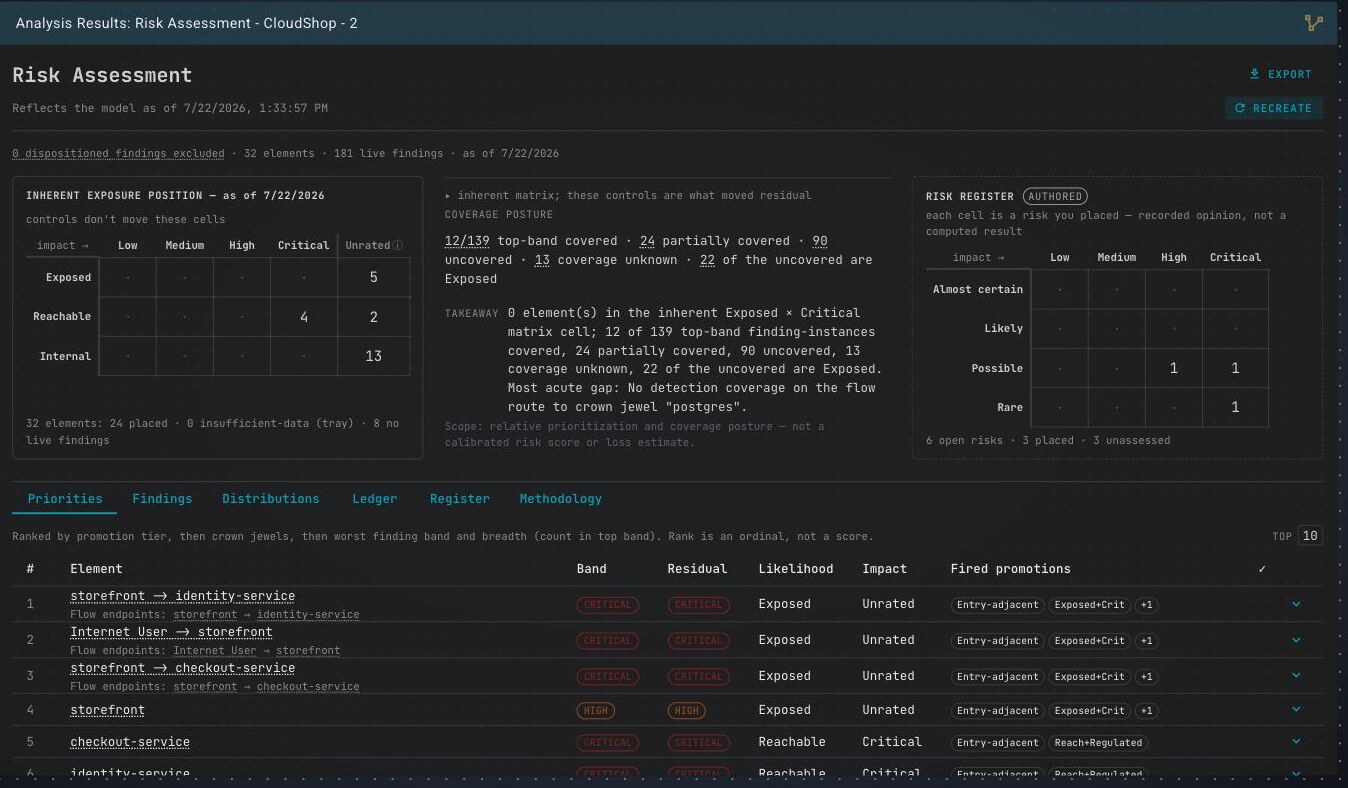
The executive band and prioritized worklist, over a demo model.
No AI making judgment calls, no external threat feed, no vendor benchmark blended in. Every band, count, and coverage ratio resolves to something you modeled. Hand an auditor the model, let them regenerate, and they get your report back line for line — the strongest thing you can put in front of a board.
It is a point-in-time draft, not a live scan. Change the model and the report tells you it is out of date instead of drifting underneath you; Recreate folds the change in. Authoring a risk in the register never touches a computed number.
From one model to
a report every stakeholder reads.
Generate the assessment, work the detail across a handful of tabs, author the risks your team owns, and export the tier each audience needs — all from one frozen, consistent assessment.
Where every element sits before a single control is credited.
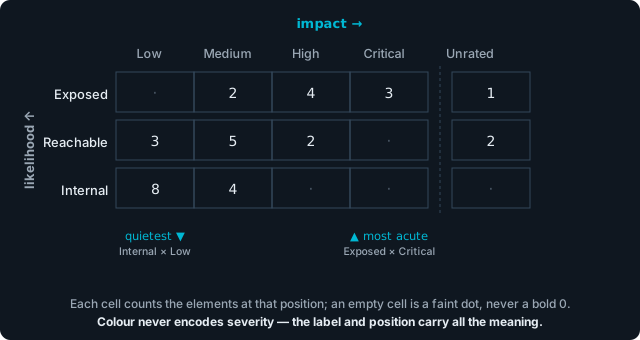
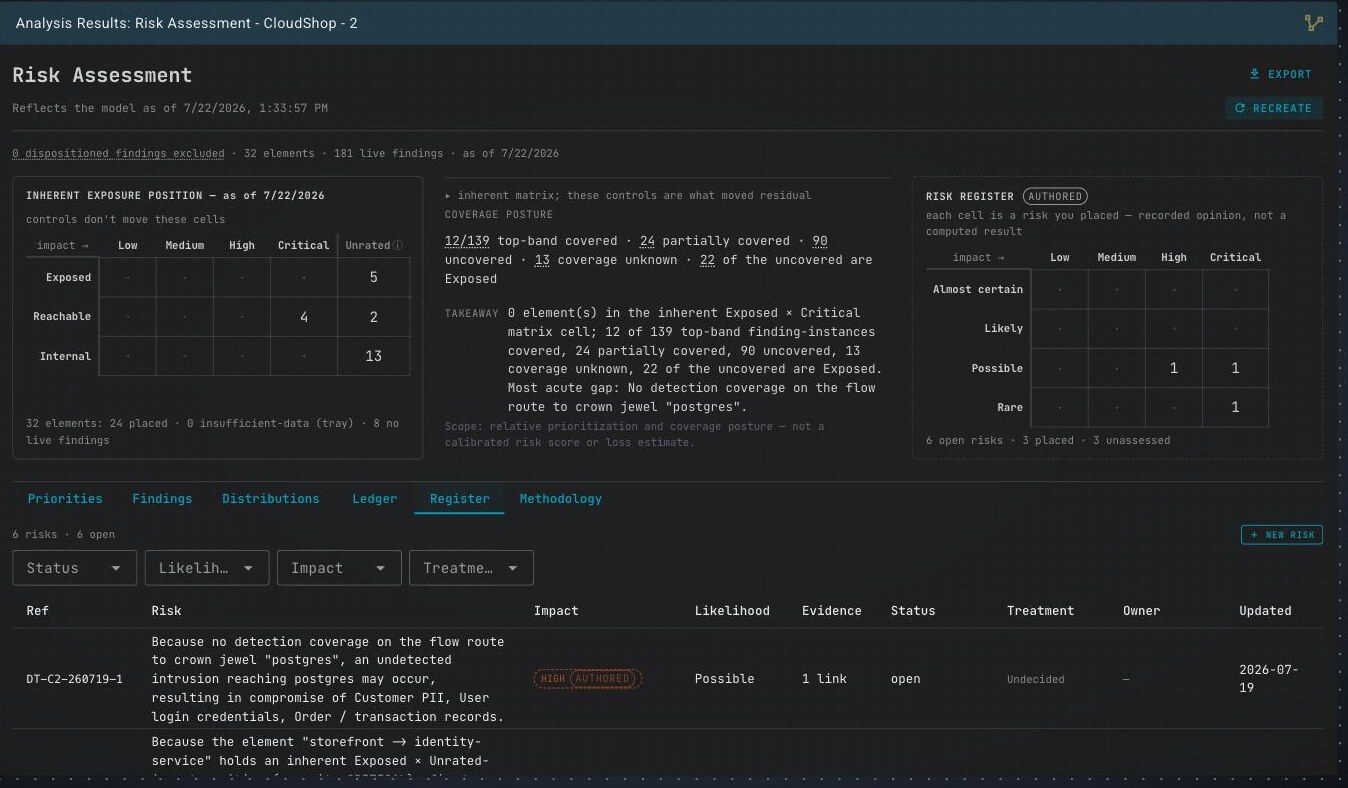
The matrix plots each element on two axes read straight from your model. Likelihood — Exposed, Reachable, or Internal — comes from where the element sits in your data flows. Impact is an ordinal built from the data it handles, any regulatory flags, and whether you marked it a crown jewel. Position carries the meaning, and the grid is monochrome, so there is no green cell to point at.
- “Inherent” means before controls — a control never quietly moves a cell; the after-controls view lives in the coverage posture and the residual band.
- Likelihood is topology, not attacker effort: “Exposed” means reachable from an outside entry point in your model.
- An element with no impact signal lands in an Unrated column — a modeling gap flagged for you, never rounded down to low.
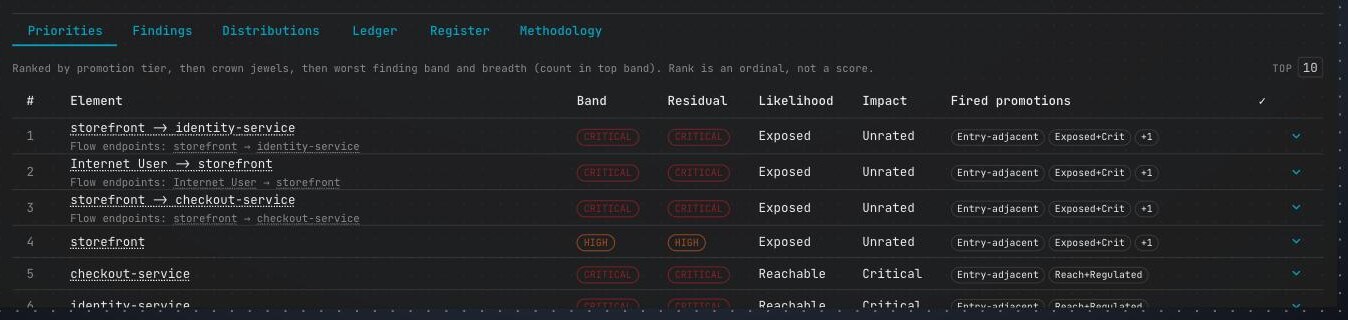
A worklist that can always tell you why row 3 outranks row 4.
The Priorities tab ranks elements, not findings, and states its own reasoning above the table. Rows are ordered by promotion tier first, then crown-jewel assets, then the worst finding band and how many findings share it. The rank is a plain ordinal built from facts you can see, never a score badge.
- “Fired promotions” name the rules that lifted a row: both Exposed and Critical, regulated data on a reachable element, a confirmed gap on an exposed surface.
- Each element carries its inherent Band and a Residual band — an effective control steps the rating down by at most one level, never erases it.
- Expand a row for coverage, source, and per-element actions: affirm, open the profile, raise an issue, or author a risk.
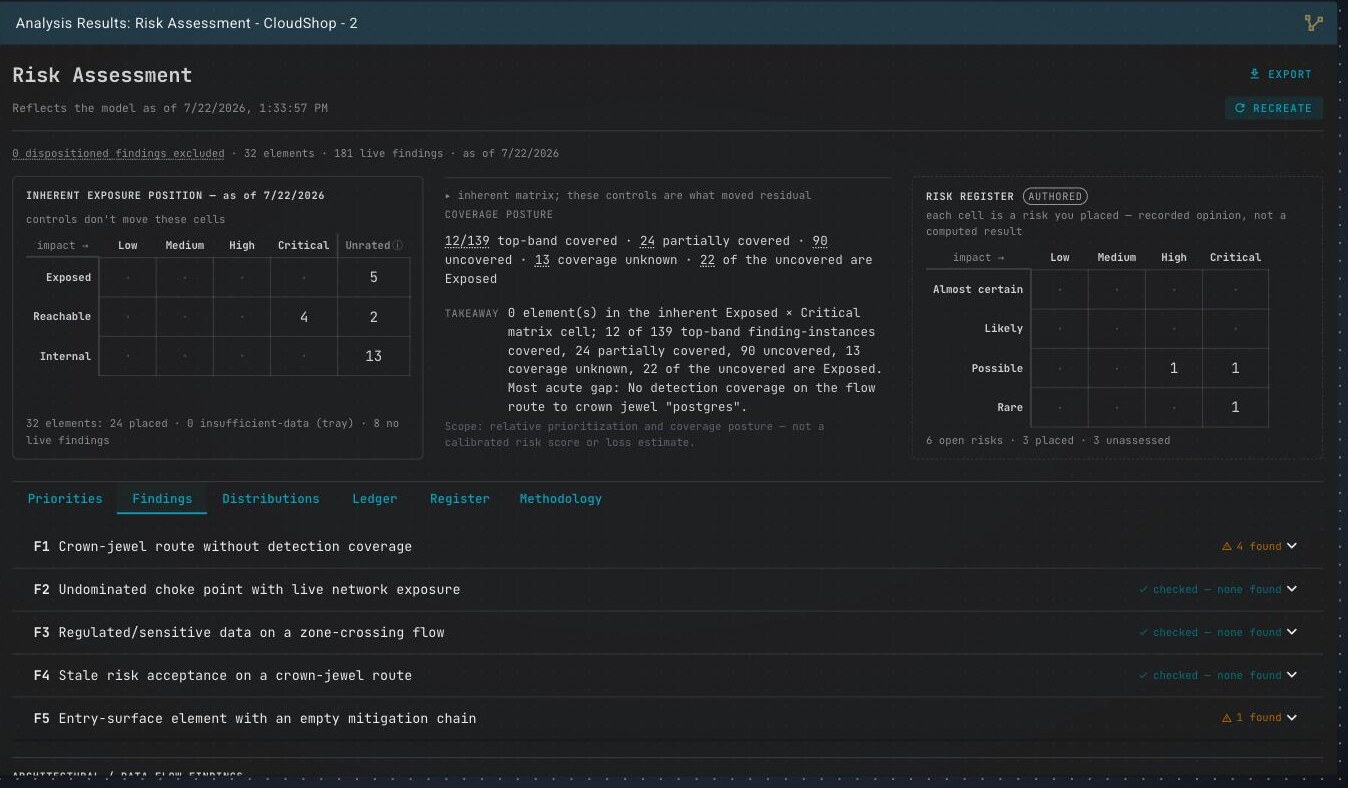
Ten deterministic checks, each with an answer you can act on.
Five control-gap checks and five zoning checks run across your model. Scan the panel headers: each check lists what it found, reports a clean pass, or says it could not run and why. Every instance links to the evidence and the elements it names.
- Control-gap checks (F1–F5): crown-jewel routes with no detection, exposed entry surfaces, sensitive data crossing zones.
- Zoning checks (F6–F10): flows that break your declared trust-zone policy, conduits that sanction an illegal crossing.
- “Checked — none found” is an earned pass; “not computable” names its reason rather than faking one.
A risk register your team owns — beside the numbers, never inside them.
Raise any finding into a tracked risk: a plain cause → event → impact statement, your own likelihood and impact, the findings that back it, a treatment, an owner, and a GRC reference handle. Nothing you author moves a computed number or marks the report stale.
- Evidence is frozen when you link it, so a risk flags itself when its finding moves: “changed since linked: HIGH → MEDIUM”.
- Your treatment decision (accept, mitigate, transfer, avoid) sits next to the computed facts, never merged with them.
- Export the whole register as GRC-ready CSV, keyed on a stable id.
One assessment, every audience you answer to.
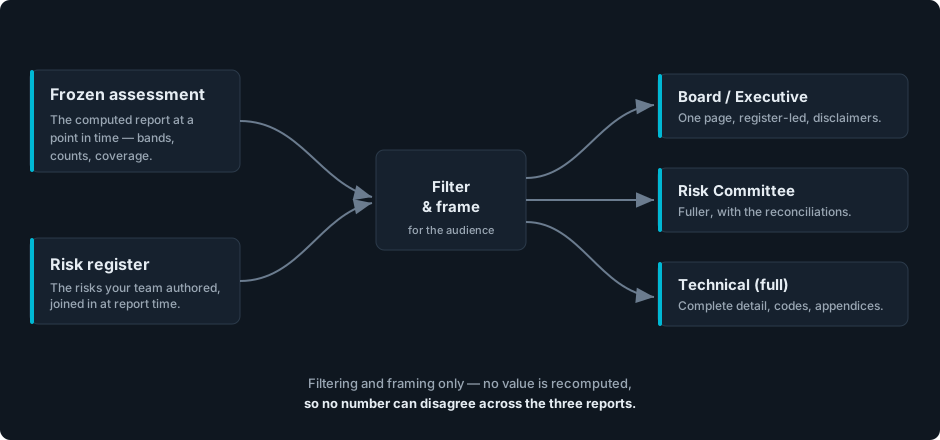
From a single frozen assessment, hand your board a one-page brief, give your risk committee the full reconciliation, and keep the complete technical detail for your team — plus JSON and GRC-CSV data exports. Each report is a framing of the same numbers, so a figure can never disagree across them.
- The board brief is a strict subset of the technical report, never a re-derivation that can drift.
- A governance preview shows exactly what each report shows and omits before it downloads.
- The “no assurance” caveat rides every tier, including the most detailed export.
Built for the analyst,
not just the report.
Every number opens up. Drill into any exposure to see what produced it, work it, and turn it into action — without leaving the assessment.
Evidence & sources
Every exposure traces to its inputs, with links out to MITRE ATT&CK, CVE, CWE, and NIST.
Transparent scoring
See the calculation and the input variables behind a rating — no black box.
Model minimap
See where a finding sits in your architecture at a glance.
Triage in place
Affirm a real risk or dispose it with a reason, without leaving the report.
Remediation candidates
The class of control a gap concerns — a candidate to consider, never a claimed fix.
Issue tickets
Raise a finding into tracked work, or into the risk register.
Same model in, same report out.
There is no hidden state and no run-to-run drift. Generate the report today and again next month over an unchanged model, and the two are identical, line for line. It is the single most useful property to hand an auditor: give them the model, let them regenerate, and your report comes back byte for byte.
It tells you when it's out of date.
The report is bound to your model as it was when you generated it. Change the model and the freshness banner switches to a model changed notice while staying fully readable; Recreate computes a fresh one. A routine edit that can’t affect a number won’t raise a false alarm, and authoring a risk never marks it stale.
A draft your board can sign off on.
Risk Assessment is an analysis you add to any model. Generate it, read the matrix and the worklist, author your register, and export the tier each audience needs — all from one frozen assessment.