
Your threat model already knows where the personal data goes.
Data Protection gives the data protection office a personal data map and Art. 30 RoPA input, built from the threat model the security team already keeps. The office marks which data items are personal and records the parties, locations and processing activities. The module puts that together with the model’s components, flows and boundaries, and shows where each personal item is held, processed and sent, who receives it, and which transfers leave the EEA.
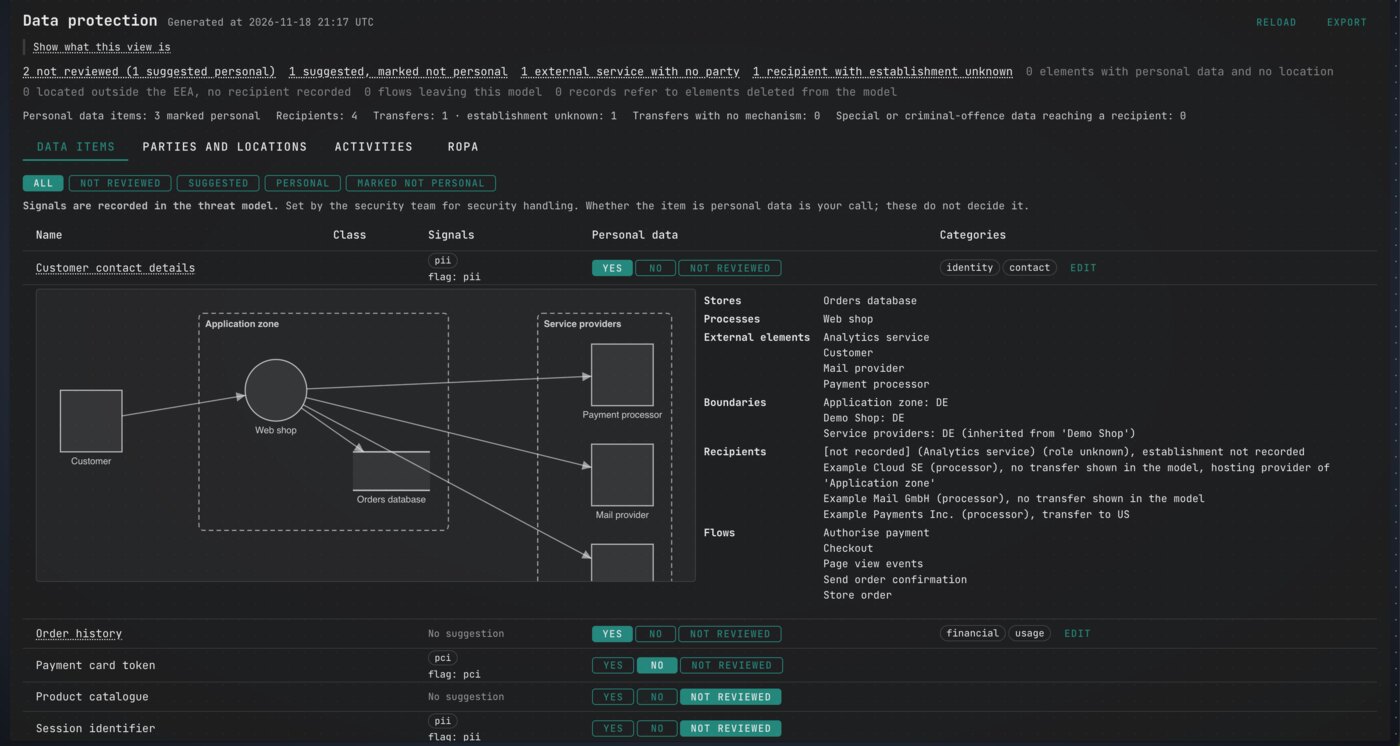
The Data protection view over a demo model with made-up personal data.
The security team keeps the model current. The office never edits it: it works in its own view of the model and adds only what it knows, such as which items are personal, who the parties are and what each activity is for. There is no second inventory to build, and when the architecture changes, the map and the RoPA input follow on the next open.
The analysis is deterministic. There is no AI, nothing is sent off your platform, and the same model and records always give the same result. It is evidence for the office, not a legal or compliance assessment: it never says that processing is lawful or that a record is complete.
From the data items you model
to a RoPA input you can hand on.
Work through four tabs in the order the work is done: data items, parties and locations, activities, and the RoPA. Then export the map and the RoPA input.
Mark what is personal. The model points at what to look at first.
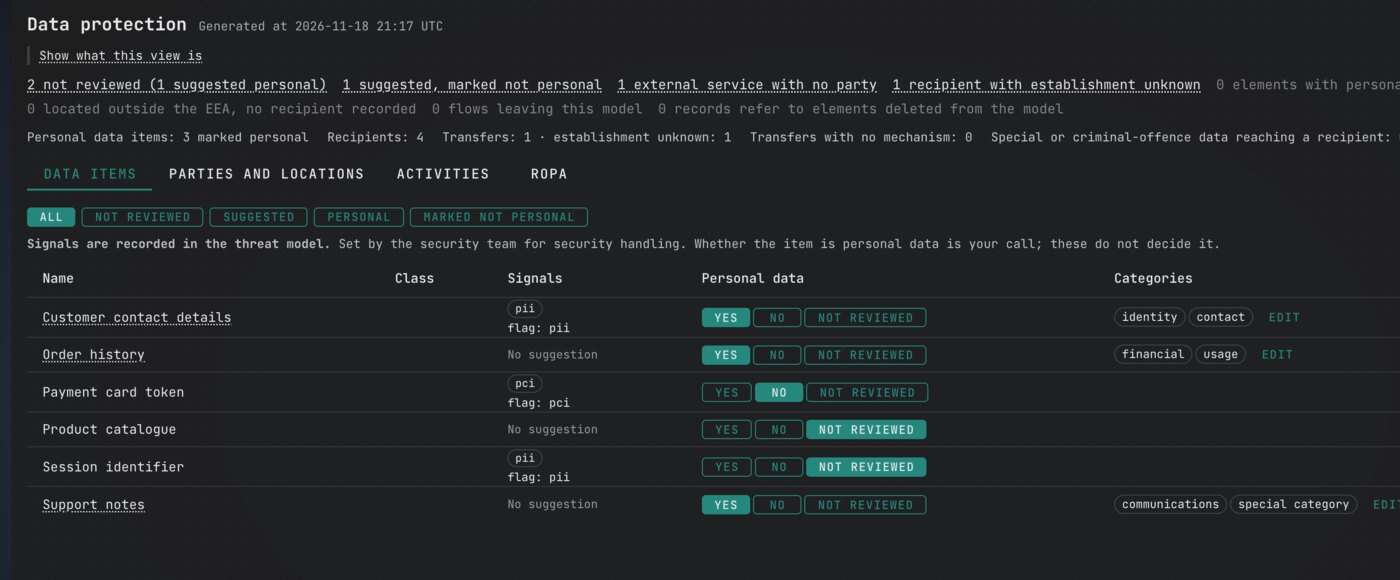
Every data item in the threat model is listed with its class and the signals the security team recorded on it. Items that look personal are suggested, but nothing is marked until someone in the office answers Yes or No. For each personal item you record its data categories, its data subjects, and whether it is special category data.
- Suggestions come from the item’s regulatory flags, its credential flag, and words in its data class’s name. Sensitivity is shown but never suggests anything.
- Special category data (Art. 9) and criminal offence data (Art. 10) are recorded per item and carried through to the activities that use them.
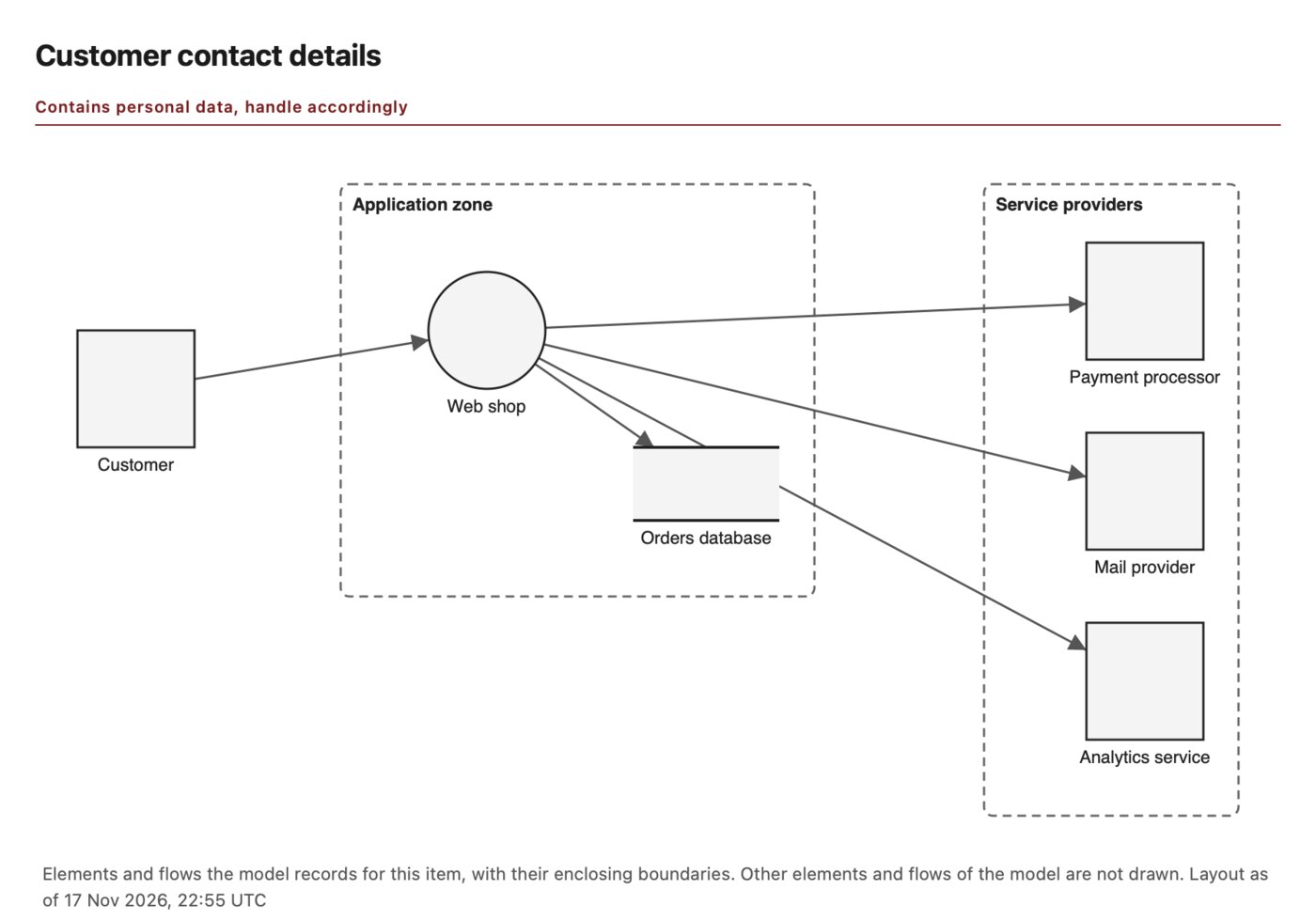
- Open a personal item to see a diagram of what it reaches, with the boundaries around it, next to its stores, processes, recipients and flows.
Where the data sits, who receives it, and whether it leaves the EEA.
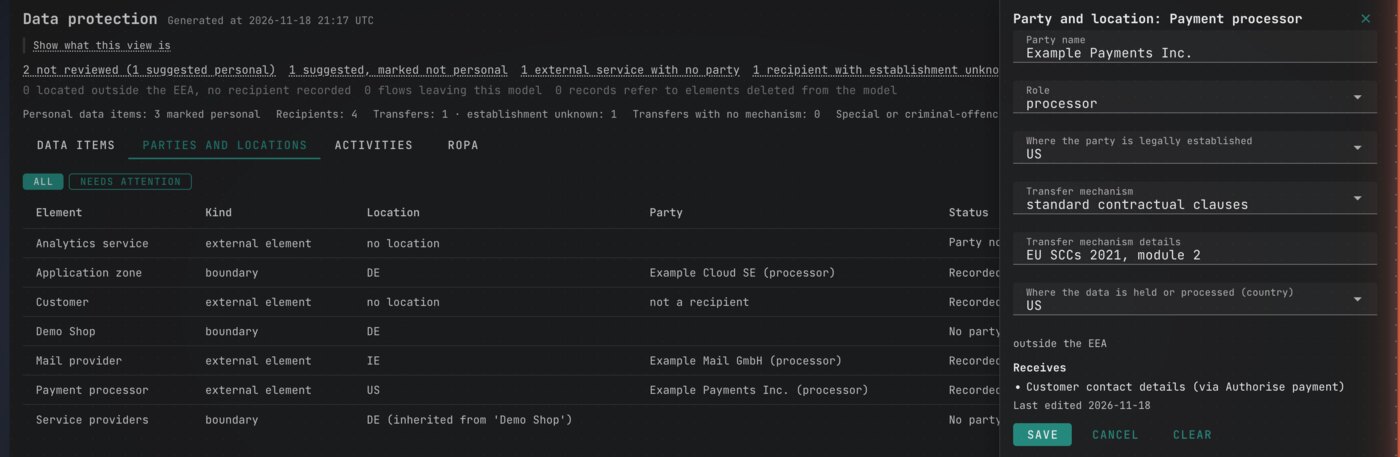
Record a country on a boundary and every element inside it takes that location. Record the party behind an external service, or the hosting provider that runs a boundary, and it becomes a recipient of the personal data that reaches it. Whether a recipient counts as a transfer is judged by where the party is legally established.
- A party established outside the EEA is a transfer. One established in the EEA but holding the data outside it reads “processed outside the EEA, not a transfer”.
- For a transfer, record the mechanism: an adequacy decision, standard contractual clauses, binding corporate rules or a derogation, with its details.
- Rows that need attention come first, with chips that say what is still open: establishment missing, transfer mechanism missing, no location.
Processing activities that start from what the data actually reaches.
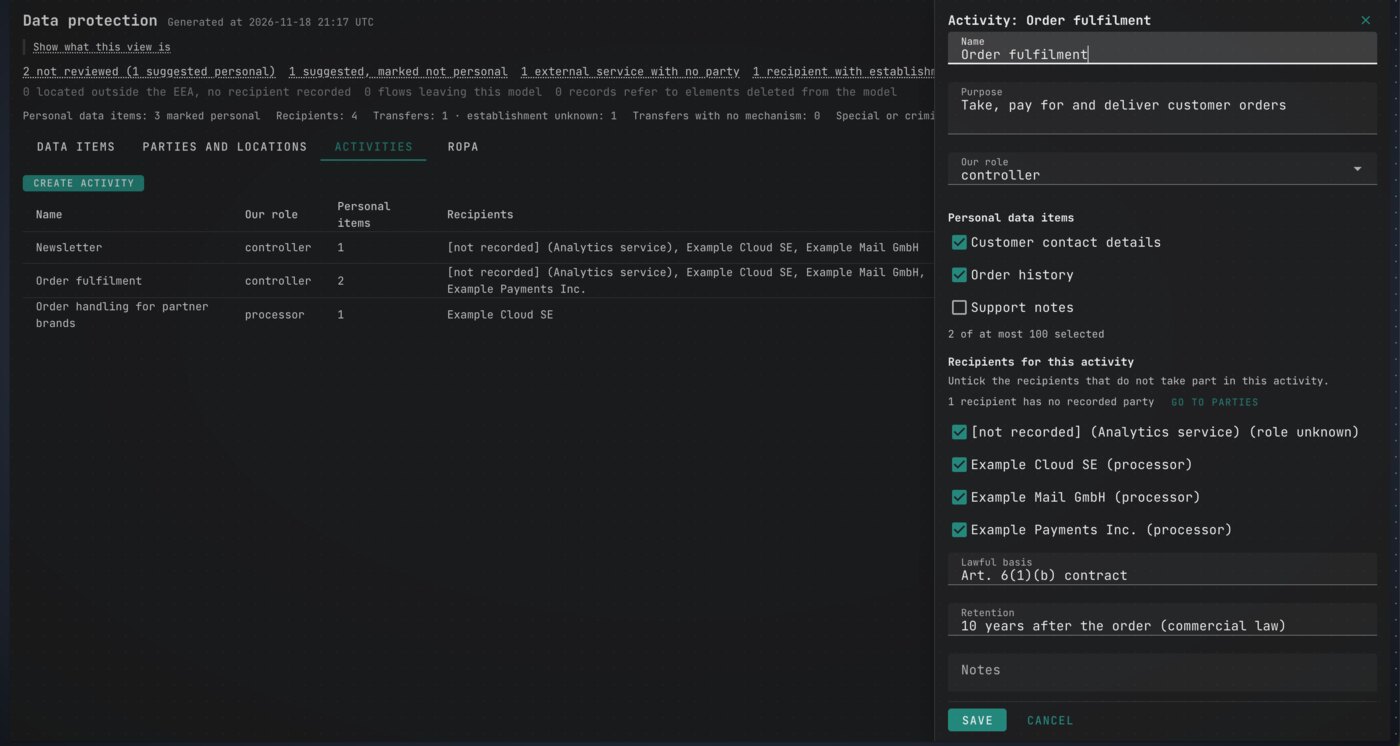
Name the activity and its purpose, pick your role, and tick the personal items it uses. Every recipient those items reach starts ticked, and you untick the ones that take no part in it. Lawful basis, retention and notes are yours to write; when a ticked item is special category or criminal offence data, the Art. 9(2) or Art. 10 condition is asked for too.
- Controller, processor or joint controller. A processor activity records the controllers it acts for.
- The list shows each activity’s items, recipients and open points, with the articles each point bears on.
- Legal text is printed as you wrote it. A filled field means the text is there, and nothing more.
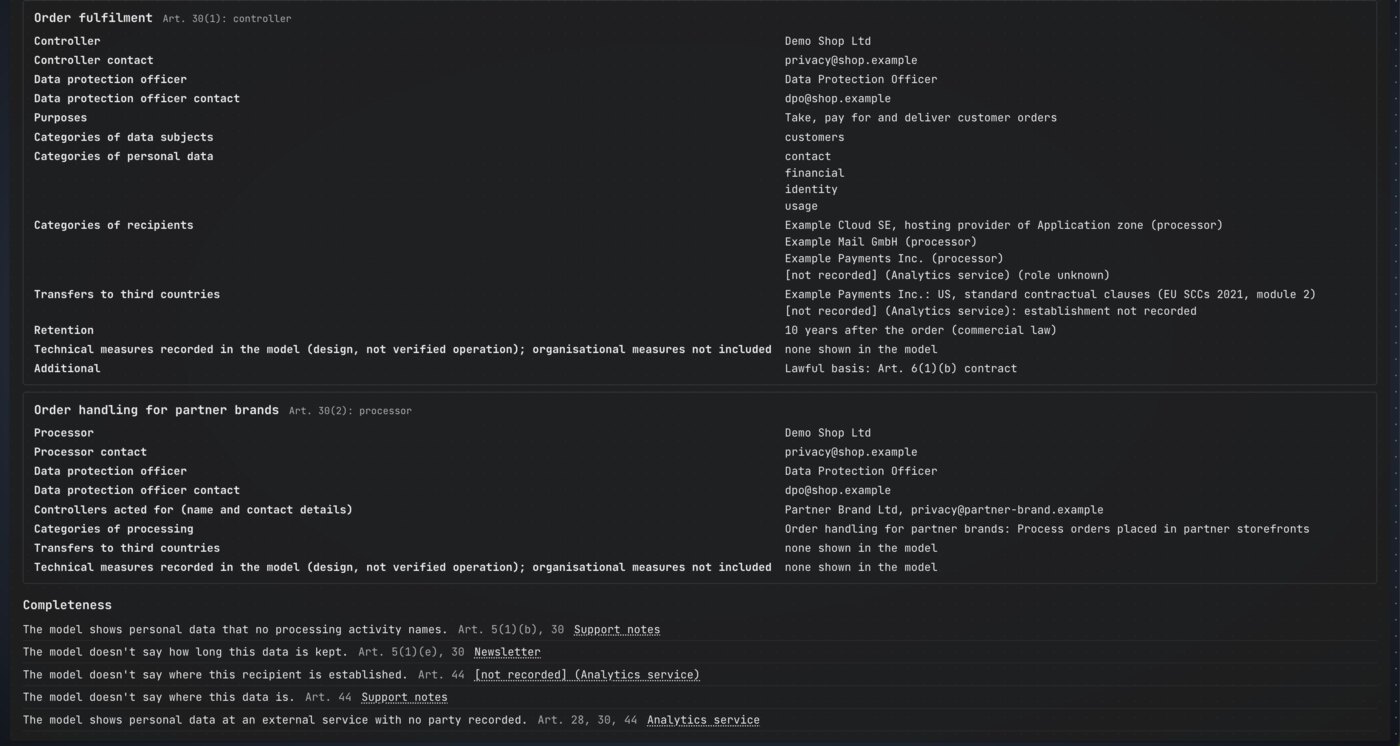
Art. 30 RoPA input, and a list of what the model doesn’t say yet.
Fill in your organisation’s record once. Each activity then prints as a RoPA entry in the Art. 30(1) controller layout or the Art. 30(2) processor layout, with its recipients, its transfers to third countries, and the technical measures the model records on the elements that handle the data. An empty field reads “[not recorded]”, so a gap is visible instead of left blank.
- The completeness list names each open point, such as personal data no activity names, a transfer with no mechanism, or a recipient with no recorded establishment, with the GDPR article it bears on.
- It also names elements that personal data reaches through flows that record no data item, so you know which flows to ask the security team about.
- Measures are labelled as recorded in the model: design, not verified operation. Organisational measures are not included.
A personal data map and a RoPA input you can hand on.
The Export menu makes three files from a fresh read of the model and your records. The personal data map has a section per personal item with its diagram, its categories and subjects, where it is held and processed, and who receives it. The RoPA input carries your organisation’s record, one entry per activity and the completeness list. The CSV holds the same entries, one row per activity, for your RoPA tool.
- Both HTML reports carry your installation’s brand, the client they are prepared for, and “Contains personal data, handle accordingly” on every section.
- Each item’s diagram draws only what the model records for that item, in the positions the security team knows from the threat model.
- The CSV keeps its column order stable and only ever adds columns at the end, so an import set up once keeps working.
Built for the office
that keeps the record.
Start each session from what is still open, and keep your records straight while the security team keeps changing the model.
A coverage line to start from
Eight counts above the tabs say what is still open, from items not reviewed to recipients with no establishment. Each one opens the tab where you deal with it.
A five-line summary
Personal items, recipients, transfers, transfers with no mechanism, and special or criminal offence data reaching a recipient.
Current every time you open it
The view is worked out from the model and your records when it opens. Nothing about the result is stored, so it never goes stale.
Records outlive model edits
Your records point at elements by id. When the security team deletes an element, its record stays, counted and listed, until you remove it.
Two people, one record
If a colleague saves the record you are editing, your save doesn’t overwrite theirs. You choose to keep yours or load theirs.
A CSV that is safe to open
Cells that a spreadsheet would run as a formula are prefixed, and every row says it came from the system model and still needs the office’s review.
The system processing you model.
The map and the RoPA input describe what the model shows, so they are as good as the model. Only flows that record a data item count, and where such a flow touches personal data the completeness list says so. Paper records, people and organisational measures are not in a threat model, so add them to your RoPA elsewhere.
The map and the RoPA input.
Data Protection 0.1.0 covers the personal data map, the RoPA input and the completeness checks. Transfers are judged against the EEA by where each recipient is established. It has no privacy risk register, DPIA screening, Art. 32 evidence section or check for personal data in logs yet. It needs platform 0.17.0 or later.
Give your DPO the model you already keep.
Data Protection is an analysis you add to any model, and it comes with every module package. Open it, mark what is personal, record the parties and activities, and export the map and the RoPA input.
Read the Data Protection guide →